
From floor plan to furnished home
HomeSim turns your floor plan into a 3D home with the right measurements. Your agent draws the rooms; you try furniture layouts in 2D and 3D, walk around inside them and make photos of them. Open source, and everything stays on your own machine.
A made-up flat, drawn from its floor plan by Codex with the skill. Switch layouts, move furniture, look at it in 3D and walk around. The interface is in Norwegian.
Open full screenHow it works
-
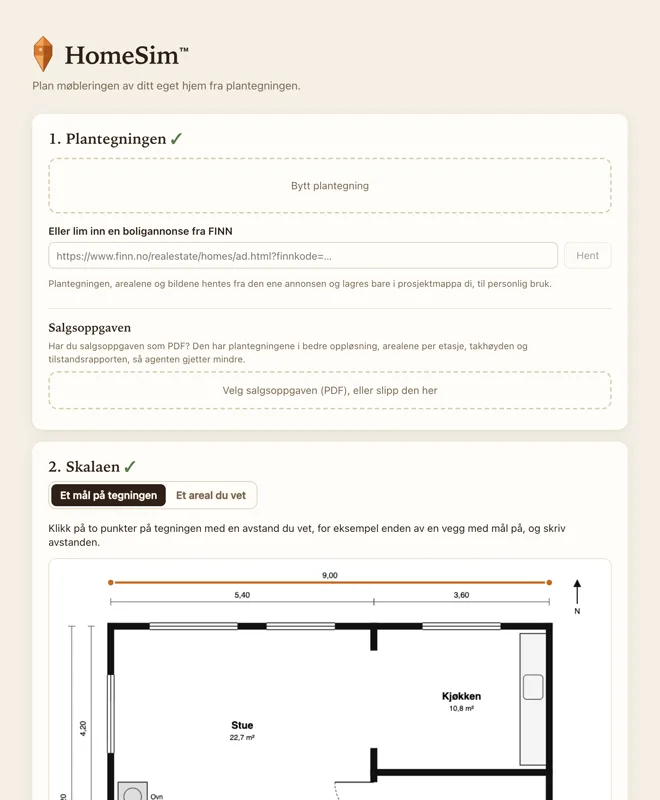
Upload the floor plan
A screenshot from the listing will do. Click two points with a distance you know, such as a wall with its length on it, and the app knows the scale.
-
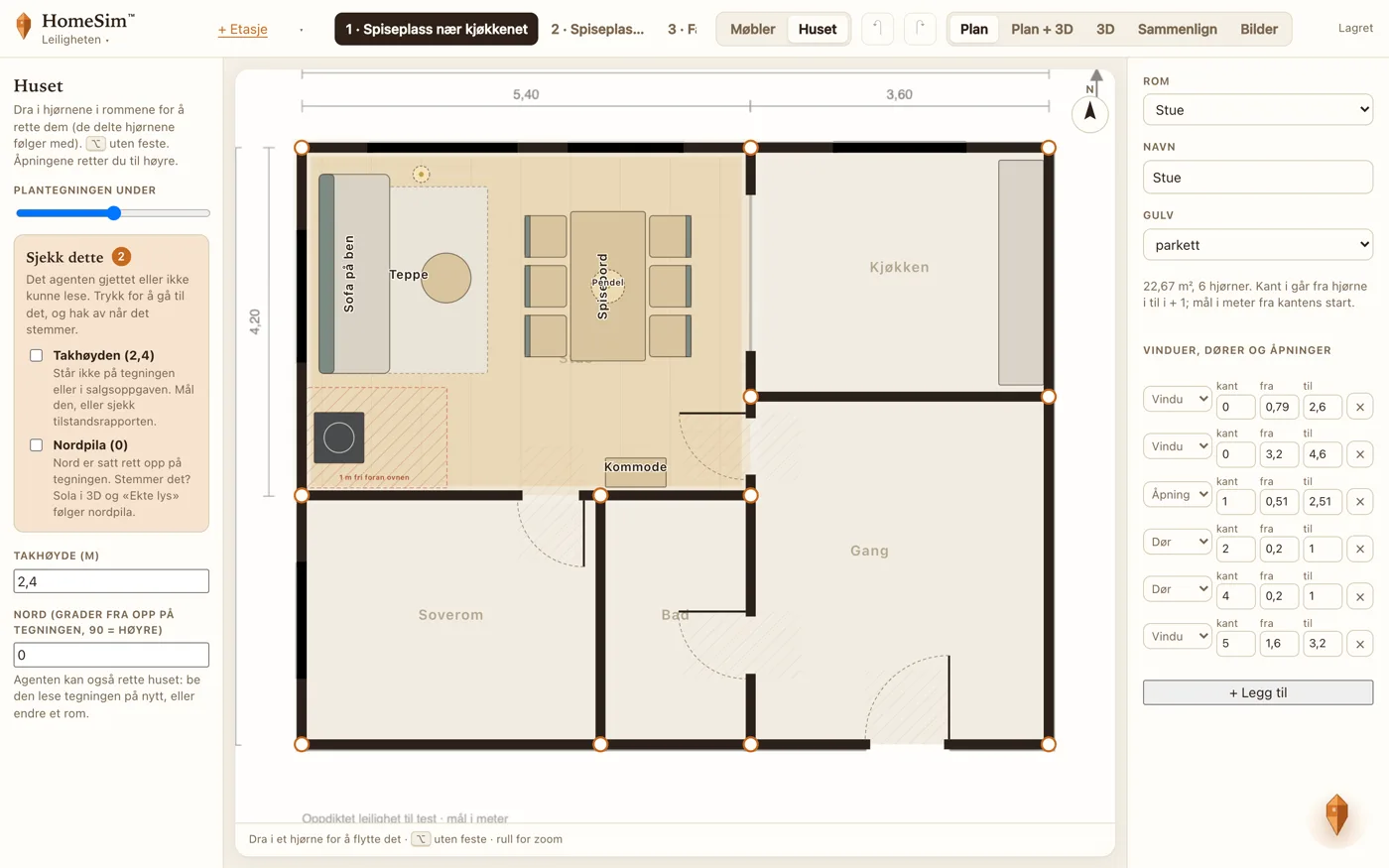
Your agent draws the house
Claude Code, Codex or Krystallen inside the app reads the plan and writes the rooms, walls, windows and doors. In “Huset” you see the plan underneath and drag the corners it got wrong.
-
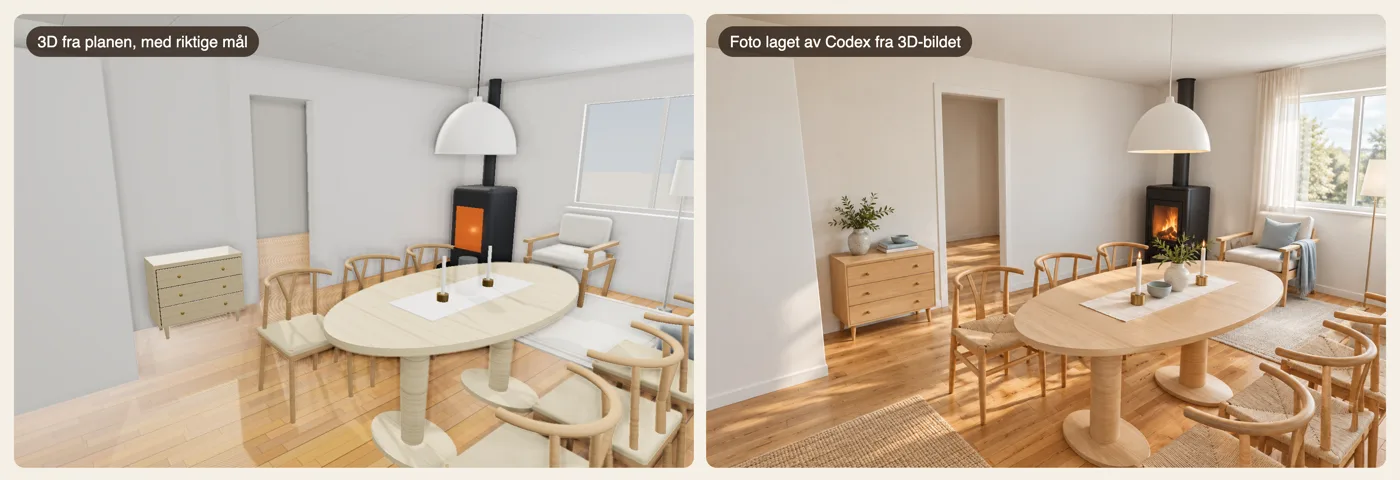
Furnish, walk around, make photos
Drag furniture into the plan and see it in 3D. Ask the agent for more layouts and put them side by side. An eye-level 3D view becomes a photo with Codex, with the furniture where the plan says.
What you can do
- Plan and 3D
- Drag, rotate and resize furniture. It snaps to the walls and to each other, and shows the distance to the walls.
- Walk around
- Walk through the house at eye level, through the doors, without walking through the sofa.
- Compare
- Layouts as tabs, and all of them side by side when it is time to decide.
- Real light
- Path tracing in the browser: sunlight through the windows and soft shadows. Takes about half a minute.
- Photos from 3D
- Codex turns the 3D view into a photo. Sizes and placement come from the plan; fabrics, light and decor are suggestions.
- Helpful rules
- Anything in a door’s swing, or closer than one metre in front of the stove, turns red.
- Your own furniture
- Build your own types, or add a 3D model (.glb) that is scaled to the size in the plan.
- Export
- The whole home with its furniture as .glb, to open in Blender or other tools.
For agents
Your choice: your own coding agent with the skill, or Krystallen inside the app. Both write the same files.
The skill
For Claude Code and Codex. It teaches the agent to draw the house from the floor plan and to make furniture layouts that follow the rules.
homesim skill
# or in Claude Code:
/plugin marketplace add JorgenStensrud/homesim
The command line
What the agent uses, and what you can use yourself.
homesim init plantegning.png hjemmet
homesim serve hjemmet
homesim valider hjemmet
homesim vis hjemmet
homesim katalog
Krystallen
The agent inside the app. It draws, furnishes, paints and looks at the pictures you give it. Sign in with ChatGPT or an API key and pay with your own account.
homesim logg-innMeet Krystallen
Krystallen is the agent inside HomeSim. It floats in the corner until you need it. While it works, it thinks out loud in a little bubble: what it is doing right now, or something it comes up with while it waits.
It draws the house from the floor plan, makes furniture layouts, paints the walls and looks at the pictures you give it. It never deletes anything you made without asking, and only makes photos when you ask.
Your files, on your machine
Local
The app runs on 127.0.0.1. There is no HomeSim server and no account.
Just files
The house and the layouts are JSON in a folder you own. You, the app and the agent read and write the same files.
Open source
MIT licence. Photos and Krystallen go through your own OpenAI account and its terms; nothing else is sent anywhere.
Questions
Does it cost anything?
The app is free. Photos are made with the Codex CLI, and Krystallen uses your ChatGPT sign-in or an API key, so your own OpenAI account pays.
How accurate are the measurements?
As accurate as the floor plan and the scale you set. In a test with a made-up floor plan, both Claude Code and Codex placed walls, windows and doors within 2 cm. The agent tells you what it is unsure of, and you correct it in “Huset”.
Which floor plans work?
PNG and JPEG: a screenshot from the listing or a photo of the drawing. Straight from above works best. A skewed or blurry plan means more to fix by hand.
Do I need an agent?
The agent is what draws the house from the floor plan. After that you can furnish, walk around and compare without one.
Does it work on a phone?
The app is made for a computer. The demo on this page also works on a phone, with the plan and 3D stacked.
What do I need?
Node 22.18 or newer. The app is built and tested on macOS. For photos you need the Codex CLI, signed in. The interface is in Norwegian for now.
Get started
Start with the example flat, or with your own floor plan. Then ask your agent: “Use the homesim skill and draw the house in hjemmet from the floor plan.”
Without cloning: npx -y github:JorgenStensrud/homesim eksempel.
git clone https://github.com/JorgenStensrud/homesim
cd homesim && npm install && npm link

# the example flat, already drawn
homesim eksempel
homesim serve eksempelleiligheten

# your own home
homesim init plantegning.png hjemmet
homesim serve hjemmet
homesim skill